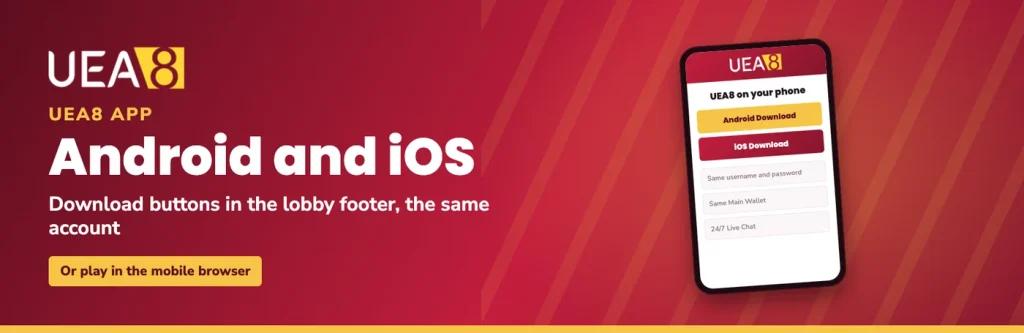
The UEA8 app is offered for both Android and iOS, and the Download buttons that start the install sit in the lobby footer. There is no separate app account to create. The username and password you already use sign you into the same Main Wallet, the same provider wallets and the same promotion dropdown, so nothing has to be moved across or claimed twice.
If you would rather not install anything, the mobile browser gives you the full lobby as well. Both routes are covered below, along with the two slot platforms that work differently from everything else.
How the UEA8 download works
Both installers are started from inside the lobby while you are signed in, not from a search result or a third-party download site. Pick the button that matches your phone: Android or iOS. Because the file comes from our own footer rather than a public store page, phones in general ask for one extra confirmation before installing software delivered this way.
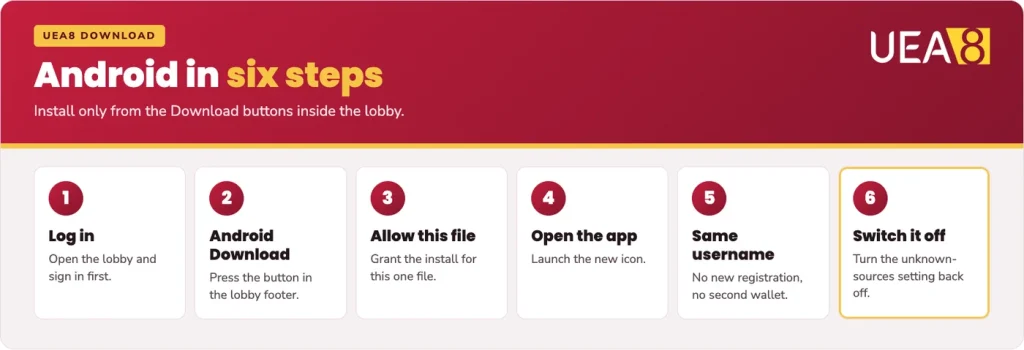
- Log in first. Open the lobby and sign in to your UEA8 account so the download starts from the real lobby footer.
- Press the Android Download button. Follow the prompts your phone shows for the file.
- Allow the install for that file. Android blocks installs from outside its store by default and will prompt you; grant permission for this single file.
- Open the app. Tap the file once it finishes, then launch the new icon from your home screen.
- Log in with the same username. No new registration, no second wallet.
- Switch the permission back off. Return to the same Android setting and turn off installs from unknown sources once you are done.
Android APK
On Android, the UEA8 APK comes from the Download button. Installing an APK is a standard part of the system, but Android keeps that door shut until you open it, which is why the install from unknown sources prompt appears. As a general habit, allow it for the one file you are installing and turn the setting off straight afterwards. That way the permission is not sitting open for anything else that lands on your phone later.
Keep the app updated the same way you installed it: from the Download button in the footer, while logged in. Older Android builds sometimes word the permission differently, mentioning the browser or file manager rather than the file itself, so read the prompt before you tap.
The UEA8 iOS install on iPhone
The iOS button works the same way: you start it from the footer, logged in, and follow the steps your iPhone shows. Apps delivered outside a store listing commonly ask the iPhone owner to confirm they trust the installer before the app will open, so do not be surprised if your phone raises that question once. Follow the prompts your device shows and the app opens normally afterwards.
If an iPhone makes the install awkward, the browser route below loses you nothing. Safari handles the lobby and the cashier, and your account behaves identically.
Playing in the mobile browser
No install, no storage used, no permissions to toggle. Open the lobby in Chrome or Safari, press Login at the top, and you are in the same account. The cashier works from the browser as well, so Funds and Transfer behave exactly as they do on a desktop, including choosing a promo code from the dropdown when you move money into a provider wallet.
Phones in general let you save a site to your home screen from the browser menu, which gives you a tappable icon without installing anything. It is a phone feature rather than something we control, but it turns the browser into a one-tap route to the main lobby.
The extras come with you too. The U-Spin wheel, the Rewards tab with your U-Coins and Mission Diary, and 24/7 Live Chat is on every page. For a phone that is short on space, or one you share, the browser is the sensible choice.
Good to know
The app and the browser share one account and one wallet, so bonuses and rebates appear in both. An instant rebate credited while you were on your laptop is waiting on your phone.
Mega888 and 918Kiss on your phone
Two of our slot platforms run in their own provider apps. Mega888 and 918Kiss are built as standalone phone apps, and in general these platforms sign you in with a game ID for that platform rather than the login you use everywhere else. If you are unsure which details to use, ask our Live Chat team before you transfer anything in.
The bonus side still runs through our cashier. Transfers go from your Main Wallet into the Mega888 and 918Kiss wallets, and the welcome and reload offers attached to them use winover rather than ordinary turnover: the 100% welcome on those two platforms is capped at MYR 300 with winover x6, and the Unlimited Reload gives 5% up to MYR 100 with winover x4. Winover generally counts your bonus against winnings rather than against bets placed, so it behaves differently from the x12 or x30 figures you see on slot and sports offers.
Two limits apply before you commit a deposit there. Mega888 and 918Kiss are excluded from the instant rebate, and they are excluded from the Daily Rescue Bonus as well. If daily rebate is a large part of how you play, keep that money in the providers that qualify.
Staying safe with APK files
Only ever install from the Download buttons inside the real lobby, signed in to your own account. We do not send installation files to players by chat link, and anything circulating in a group chat, a forum post or a comment thread did not come from us.
Three things identify the real lobby: the UEA8 logo with the gold 8, a login box with Forgot Password? underneath it, and the 24/7 Live Chat button that follows you from page to page. The U-SPIN wheel and the Rewards tab are there too. If a page asking for your details is missing those, close it and start again from a link you trust.
Standard phishing sense applies on a phone as much as a computer. Nobody from our team asks for your password, and a page that wants it outside your normal account login is not ours. Enter your details only after you have checked the page, and if anything looks off, ask Live Chat before you type.
The Download buttons for Android and iOS sit in the lobby footer, and the app opens with the username you already use.
FAQ
Is there a UEA8 app for iPhone?
Yes. The lobby footer carries an iOS Download button alongside the Android one. Start the install from that button while logged in, and follow whatever prompts your iPhone shows before the icon appears on your home screen.
Is the APK file safe to install?
Install it only from the Android Download button inside the real lobby. Downloads sent by strangers in chat groups, forums or comment threads are not ours, and we never send installation files to you by chat link.
Can I use the same account in the app and on my computer?
Yes. One username, one password, one Main Wallet. Log in with the same details and your balance, bonuses, instant rebate and U-Coins are identical wherever you sign in.
Do I need the app to play?
No. The mobile browser carries the same lobby, cashier, U-Spin wheel and Rewards tab. The app is a convenience, not a requirement.
Why do Mega888 and 918Kiss need their own apps?
Those two platforms are built as standalone apps rather than browser lobbies, and in general they sign you in with a game ID for that platform. Your bonus transfer still happens in our cashier, and winover rules apply to those wallets instead of ordinary turnover.